Showing posts with label Photoshop. Show all posts

Saturday, March 23, 2024

The Chair_3D Life Drawing

  I did some 3D conversions by hand, (NO A.I.), of some life drawings of mine awhile ago but forgot how I did it.  So I tried a drawing I hadn't done using Photoshop.  It's so so...  Two of them are free-view, if you can do that, and the color one requires the red and green glasses used for anaglyph 3D.

Anaglyph_ Red & Green Glasses

X_Cross-Eye


Parallel View


Monday, April 10, 2017

Adding Color to Faded Photo

Before and After Restoration  (click on image to enlarge)
A friend sent me a picture from his childhood that his mother treasured.  It's a good example of the instability of color photography.  For whatever reason the colors fade and eventually become almost monochromatic leading toward sepia.

Using Photoshop I was able to do a restoration that my friend was happy with.  It was kind of tricky  because detail in areas like the stitching on the collar and cuffs would drop out.  Thankfully, through some trial and error, I worked it out.

Saturday, February 06, 2016

Retouching Younger Days

I had the pleasure of restoring an old photo for a friend.  His wife only had this one picture of herself as a teen and it was badly damaged.  This was kind of a tricky restoration because of the back lighting wanting to turn her face into a dark puddle, but my friend was happy with the results, so yahoo.

BEFORE
AFTER

Sunday, October 06, 2013

October is Here!

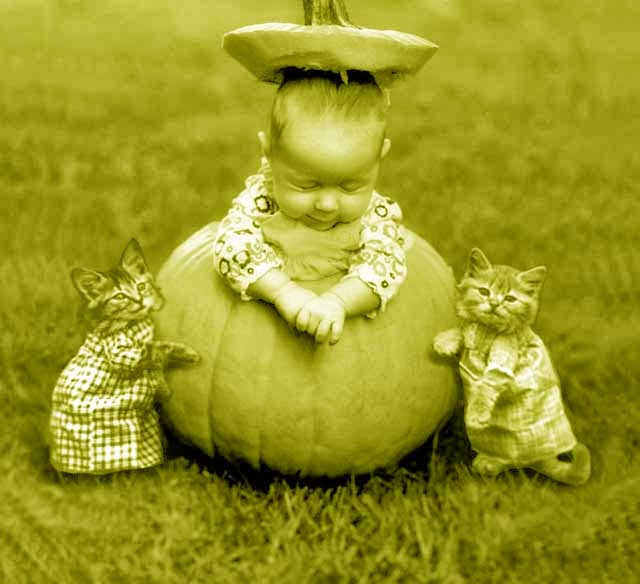
Yes, it's time for the Pumpkin Queen to wake up soon and make her Halloween presents known.

I thought I would try to make color separations from a black and white picture, and try to recombine them into a quasi color picture. This one of my grand daughter taken by her Aunt Joanna Zarzan and tricked out with kittens that I added is one of my favorites.  I knew if you had a blue and yellow plate you would get a green and red and yellow would make orange.  It only worked so so and the end result reminds me of those early National Geographics where the color was leaning toward sepia and looked like tinted prints.

It's got an old fashioned feel which is okay with me so Happy Halloween everybody! 


Wednesday, January 09, 2013

Photoshop Fairy


I have the most beautiful grand kids,(seven of them, but who's counting?), and my two youngest are just too adorable. My young grandson is a pleasant and good-natured fellow with a winning smile that reminds me of one of my favorite people, Oliver Hardy. So it was not my intention to play favorites by eliminating my grandson from this group picture taken at Halloween. In fact I think he makes a very good lemur. But just look at my granddaughter. What a beauty, how could I resist not taking this image further? She too was the model for "The Pumpkin Queen" featured repeatedly elsewhere on this blog.
Don't worry, young grandson, your time is coming!

Tuesday, January 11, 2011

Retouching Family #2

A friend of the family saw my restoration of our kids done with Photoshop, (it's an earlier posting on this site somewhere), and asked if I could lighten a picture of their grandmother? All they had was a copy of an old newspaper clipping. It was pretty streaky with a herringbone caused by the Benday dot patterns newspapers use to get halftones. There was something that looked like a feather in her hair but it maybe part of that herringbone effect so I downplayed it and left it out. The whole thing should have been repainted but I didn't have the time and the end result is a little ghostly. It's not my best work and I haven't heard back from them yet but it was free so they can't complain too much.

Click on image to enlarge

Friday, November 12, 2010

Retouching Family

My wife found this damaged photo of our two oldest kids. She was very upset so I did a little Photoshop on it. You have to love that Clone Brush!

Click on images to enlarge

Tuesday, October 26, 2010

The Pumpkin Queen

All Hail The Pumpkin Queen! This is a photo of my granddaughter taken by her Aunt Joanne Zarzana. I pushed it over the top by adding the kitties. This will probably be my next painting.